
As small business owners, we’ve gotten VERY used to working while on a cruise vacation. It’s just our reality, and truthfully, we don’t even mind it most of the time. We enjoy what we do, and that work gives us the freedom to travel more than we could if we worked traditional 9-to-5 jobs.
However, we didn’t ALWAYS work while on vacation.
I still remember when we first started cruising more than 20 years ago. Back then, internet access on cruise ships wasn’t really a thing. And “good internet”? Definitely not.
My husband, Brian, owned a full-service marketing company and stayed incredibly busy. One of the reasons he loved cruising so much was that it forced him to completely unplug and relax, mostly because he didn’t have a choice. It was his once-a-year forced break.
This post may contain affiliate links. As an affiliate, I may earn a small commission if you click, purchase, or apply for an offer. This is at no extra cost to you. As an Amazon Associate, I earn from qualifying purchases.
Then, one spring break cruise, work REALLY got in the way.
The night before we were supposed to board, the police called in the middle of the night. Someone had broken into Brian’s office and stolen every laptop that employees had left there overnight.
He was a huge ball of stress!
He spent the day on the phone with the police, ordering replacement equipment for employees, dealing with repairs, and worrying about the extra security the office would now need. It was not exactly the relaxing start to vacation we had planned. He knew he’d be difficult to reach for the next week and even considered staying on land while the rest of us boarded the ship.
Thankfully, he had an employee he trusted who stepped up and helped manage things while we were away, but it was still incredibly worrisome. Thanks again, Mike.
Since that cruise, staying connected is a must.
Many cruise lines now offer much better onboard internet, often powered by newer satellite systems like Starlink. It’s expensive, but it’s much more reliable than it used to be. What used to be a chance to disconnect and de-stress has turned into, “We need connectivity, so we don’t stress.”
So yes, we pay the painful price for cruise ship internet and keep things moving. There’s work to be done.
This may not be your reality. If not, awesome! However, if you need to manage work while you’re on vacation so that you are LESS stressed, this post is for you.

Can You Really Work While on a Cruise?
Yes, you absolutely can work from a cruise ship.
That said, whether it works well depends on your job, your expectations, and how much connectivity you truly need. If your work is mostly writing, email, light admin tasks, or occasional messaging, working from a cruise ship is very doable. If your job depends on flawless video calls, secure systems, or large file transfers all day long, it can get trickier fast.
For us, it works because we’re flexible. We know the internet may not be perfect, we adjust our schedules, and we prioritize what truly needs to be done onboard versus what can (or should) wait until we’re in port or back home.
What You Need to Work While on a Cruise
Your Work Equipment
Your setup may be as simple as a phone and/or tablet, or as involved as a laptop, chargers, external hard drives, files, earbuds, or a headset.
Before your cruise, make a checklist of everything you need to actually do your job. Don’t just think about the device itself. Think about charging cables, adapters, passwords, two-factor authentication, and anything you regularly use without thinking about it at home.
Noise cancelling earbuds or headphones can make a big difference when you need to focus. So, add that to your list.
If you forget a charger or need a replacement accessory on land, that’s usually fixable. On a cruise ship, your options are much more limited and costly.
Related Post: How to Get Work Done While You are Traveling
Cruise Ship Internet
First and foremost, you’ll need internet.
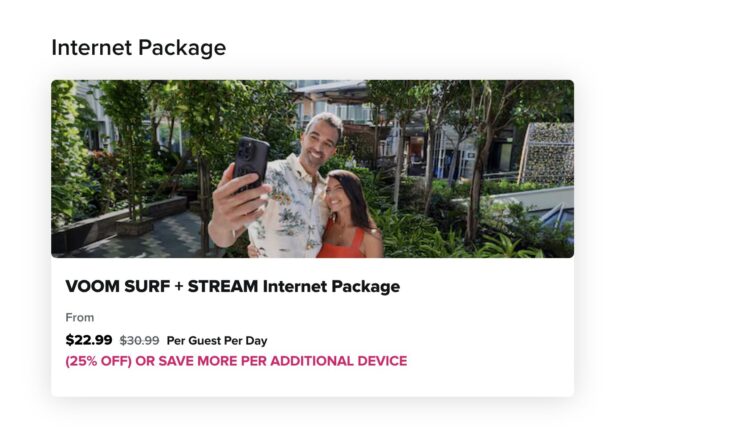
That’s the biggest piece of the puzzle, and it’s also usually the most frustrating. Cruise internet has improved, but it is still expensive and can be inconsistent depending on the ship, itinerary, weather, and the number of people online.
A few tips:
- You usually do not need to buy internet for every single device unless you truly need to use them at the same time.
- On many cruise lines, you can log out on one device and switch to another as needed. For example, you might use your laptop in the morning and your phone later in the day.
- If you’re traveling with a spouse or friend, it can sometimes be cheaper for one person to buy a multi-device package than for each of you to buy a separate single-device plan.
That said, sharing a package can be mildly annoying. Sometimes one person gets kicked off as the other logs in. The transitions are not always seamless. But if you’re trying to save money, it can still be worth it.
Related Post: The Extras of Cruising: Free Cruise Budget Planner Worksheet
Using an E-SIM Instead of Ship Wi-Fi
There are newer options now, including e-SIM services like GigSky that offer land-and-sea data plans.
These can be significantly less expensive than the cruise line’s internet package, which makes them appealing. But there are trade-offs.
Because these plans are cellular-based rather than the ship’s Wi-Fi package, you may need to use apps like WhatsApp or other internet-based messaging services instead of relying on your normal texting or iMessage setup. You’ll also need to switch over to the e-SIM and typically keep cellular service turned on for that plan to work.
As a longtime cruiser, I’ll be honest: the idea of not putting my phone in airplane mode still makes me anxious. Old habits die hard.
Still, e-SIMs can be a great option for some travelers. Be sure you check with your carrier before your trip to confirm your phone is unlocked and compatible.
Want to try GigSky? (Use my referral code for a discount – JILL220 for 25% off your first data plan purchase)
Making and Receiving Phone Calls on a Cruise
Many smartphones let you enable Wi-Fi calling, which lets you make and receive calls over Wi-Fi instead of cellular service. You’ll want to toggle this on before your trip when you have access to your home wifi.
Yes, your phone can remain in airplane mode while using Wi-Fi calling.
This can be incredibly helpful if you need to stay reachable while onboard, but there’s one important catch: some cruise lines may limit or block certain calling features. So do not assume it will work perfectly on every sailing.
And one tiny plea from all of us sharing public spaces on board: please be mindful of your calls. Nobody wants to listen to your loud conversation during dinner or while relaxing by the pool. (And not just the work ones!)

Finding Your Remote Office at Sea
One of the biggest parts of working from a cruise ship is figuring out where you actually want to work.
Your ideal setup may be completely different from someone else’s. Some people prefer working in their cabin for privacy. Others like a shaded area on the pool deck with fresh air and a little people-watching. Some rotate between their balcony, a quiet lounge, or a coffee bar, depending on the time of day.
A lot of it depends on what kind of work you’re doing.
If you need to jump on a Zoom call, your cabin is probably the best option. People around the pool do not want to hear your team meeting while they’re trying to enjoy their vacation.

If your work is more like mine — writing, emailing, updating client communications, and handling lighter business tasks — your options are much more flexible.
Brian and I usually prefer to get our most important work done first thing in the morning. When we sail with Royal Caribbean, we often head to the loyalty lounge if we have access because it’s usually quiet early in the day, and we love having decent coffee nearby. If we can knock out the bulk of our work in the morning, it frees us up to enjoy the pool, relax, or head out on a port day without feeling like work is hanging over our heads.
Of course, your schedule may depend on coworkers, client expectations, time zones, or meeting windows.
When possible, try to batch your calls, meetings, and focused work into one block of time. It makes it much easier to stay productive and still enjoy your cruise.
The Biggest Pain Points of Working From a Cruise Ship
1. The Cost
We’ve already touched on the price of cruise internet, but it really is one of the biggest downsides.
If you do not need the internet for work, I would skip the extra cost entirely and enjoy the chance to disconnect. If you just need to “check in”, port areas usually have a free wifi zone that you can access right off the ship. But if you do need it, it helps to think through whether any of that cost can be offset.
If you work for an employer, ask whether part of the internet package could be reimbursed as a business expense. If you’re self-employed, it may be worth discussing with your accountant whether it qualifies as a business expense for your trip. Or consider lower-cost alternatives mentioned earlier, such as e-sims.
I’ll also say this: as a cruise travel agent, I know the cruise industry is competing with land vacations, and this is one area where cruising can still feel frustrating. Most land vacations include Wi-Fi in the overall price. Sometimes you pay extra for premium speed, but basic access is often just included. For new cruisers, it can be a real shock to realize not only that Wi-Fi is extra but also that it can add a substantial amount to the overall vacation cost.
Related Post: Top 25 Questions Asked by New Cruisers
2. Security Concerns
This is the part that makes me the most cautious.
Cruise ship Wi-Fi is an open network, and if your work requires a highly secure connection, that can create real issues. If you handle sensitive information, access financial accounts, or process payments, you need to think carefully about what you should and should not do on board.
I use Surfshark VPN in my daily life. But onboard, I’ve often had to turn it off to access the ship’s Wi-Fi, which is incredibly frustrating. I’ve asked the internet representatives about it more than once, and I’ve gotten the same response each time: “That’s just the way the system works”.
Because of that, I do not check banking or process client payments while I’m onboard. If I absolutely need to handle those types of tasks, I wait until I’m on land and can secure my connection via my VPN.
That may be overly cautious to some people, but for me, it’s a hard line.
Try Surfshark and receive up to 3 months free with my referral link.
Distractions When Trying to Work
Discipline. That can be tough for all of us. As mentioned earlier, it may be difficult to focus on work when the ABBA Trivia is calling your name, or there is that espresso martini that isn’t going to drink itself.
Be honest with yourself about your ability to dial into work…and your ability to put it aside just so that you aren’t missing out on your vacation.
Is Working While on a Cruise Worth It?
For us, YES!
Would I call it ideal? Not always.
It can be expensive, occasionally frustrating, and definitely not as seamless as working from home or a hotel with strong, included Wi-Fi. But it also lets us keep traveling without feeling like we have to step away from our business every time we take a trip. For me, traveling IS my business.
That balance matters.
Cruising still gives us the rest, fun, and family time we want, but modern connectivity gives us enough peace of mind to step away while still staying connected when needed.
And honestly, sitting with a coffee and a laptop while the ocean rolls by is not the worst office setup I’ve ever had.

Conclusion: Yes, You Can Work While on a Cruise (If you Need to)
Working from a cruise ship is absolutely possible, but it works best when you go in with realistic expectations.
You’ll need the right equipment, a plan for internet access, some flexibility, and a clear understanding of what tasks are safe and reasonable to handle while onboard. For some people, it may be the perfect way to blend work and travel. While others, it may only make sense for light tasks and quick check-ins.
For us, it has become part of the rhythm of how we travel.
We work early, stay flexible, protect the tasks that require more security, and then enjoy the rest of the day knowing we took care of our key tasks.
If that sounds like your kind of balance, a cruise ship just might be a surprisingly workable remote office.
Worrier’s Guide:
If the idea of working while on a cruise ship makes you nervous, here are a few things to keep in mind:
Do a test run before your cruise.
Turn on Wi-Fi calling at home, verify your logins, and make sure any apps or platforms you need are working properly before embarkation day.
Do not assume the internet will be perfect.
Even on ships with improved connectivity, internet speeds can vary. Build in extra patience and avoid scheduling anything too high-stakes if possible.
Be careful with sensitive work.
If you need a very secure connection, process payments, or access banking information, it may be better to wait until you are on land and can use a more secure setup.
Know your backup plan.
If you absolutely must be reachable, tell coworkers or clients ahead of time that you’ll be working from a cruise ship and the internet may occasionally be spotty.
Don’t let work take over the whole trip.
The goal is to support your vacation, not ruin it. Try to batch your work so you can still enjoy the cruise you paid for.
Let’s Connect
Finding Jillian Ultimate Cruise & Travel Planner (digital download/printable)
Follow me on Facebook at Finding Jillian Cruise Travel
Visit my curated lists in my Amazon Storefront
Follow me on Pinterest at Finding Jillian
Follow me on Instagram and YouTube at Finding Jillian
Subscribe to my newsletter.
Pin for later